
Current Trade Ads
Browse live offers from tradersBlox Fruits Trade Ads – Post & Find Connect
The feed above shows every active offer posted by real BloxValues users — login with Roblox, post your ad, and find a match without bouncing between 12 Discord servers. No middlemen. No trust trades. Just verified players with checked values.
Most trade boards make you leave to verify if a deal is fair. This page has the Blox Fruit Calculator built in, so you can check any offer before you reply.
Quick answer:
- Post a trade ad free, just login with your Roblox account
- Browse by All Trades, Newest, or Expiring Soon
- Chat directly with the poster from the ad card
- Always verify values before accepting any deal
How Do Blox Fruits Trade Ads Work?
A trade ad is a public offer — you list what you have and what you want, then other players message you to work out the deal. It’s faster than jumping server to server in-game hoping someone has the exact fruit you need.
Every ad on this page shows the poster’s Roblox username, their offer, and a direct Chat button. Ads stay live for 24 hours, then expire automatically. You can repost anytime.
The one thing most other trade boards skip: value verification. Before you message anyone, run both sides of the deal through the Blox Fruits value calculator. A trade that looks fair at a glance can be a 30–40% loss once you check real numbers.
How to Post a Blox Fruits Trade Ad
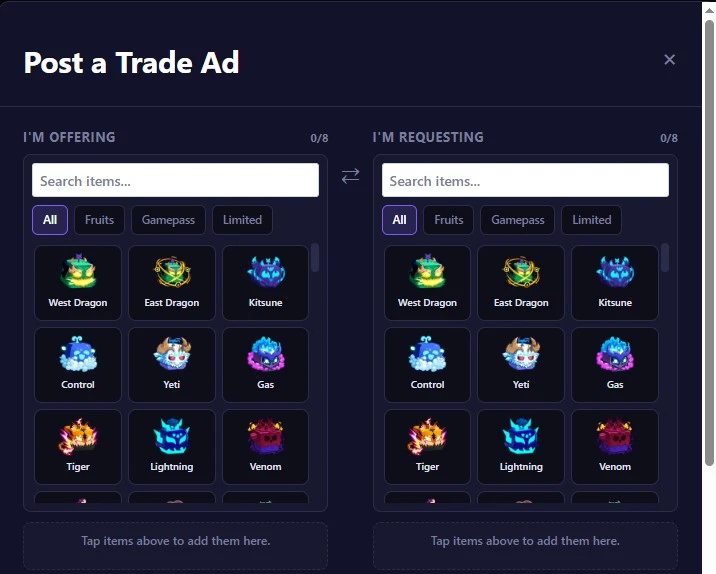
- Login with Roblox: Click Login at the top. It pulls your username and avatar directly from Roblox. No password stored on our end.
- Click “+ Post Trade Ad”: The form opens above the live feed.
- Add what you’re offering: Select each fruit or item from the dropdown.
- Add what you want: Be specific. “Kitsune or Dragon + adds” gets more replies than just “Kitsune.”
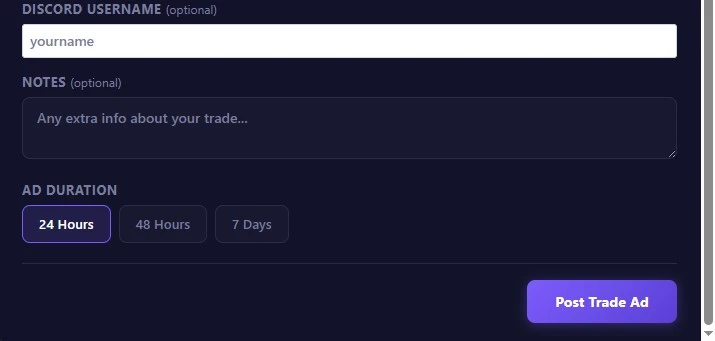
- Set a note (optional): Use this for trade location, server preference, or if you’re adding Beli as compensation.
- Submit: Your ad goes live instantly and stays active for 24 hours.
Keep your Roblox account online while your ad is active. Players who click Chat expect a quick reply – slow responses get skipped.
What Can You Actually Trade in Blox Fruits?
Not everything in your inventory is tradeable. Here’s what the game allows:
| Item Type | Tradeable? | Notes |
|---|---|---|
| Normal (Physical) Fruits | ✅ Yes | Must be in your inventory, not eaten |
| Permanent Fruits | ✅ Yes | Worth significantly more than Normal |
| Robux Scrolls | ✅ Yes | Only scrolls bought with Robux qualify |
| Game Passes | ❌ No | Account-bound, non-transferable |
| Beli | ❌ No | Cannot be traded directly |
| Fighting Styles | ❌ No | Account-bound |
Permanent fruits hold value better than Normals across every tier. If you’re stacking fruits to trade up toward a Mythical, prioritize Permanents — they retrade closer to full value and demand stays more stable between updates.
Trading requires Second Sea access (Level 700+). The trade window opens at the Café in Kingdom of Rose, or at the Mansion in Third Sea (Level 1500+). Check the official Blox Fruits game page if you’re still unlocking sea access.
Reading the Live Feed – What Each Card Tells You
Every ad card shows four things: the poster’s Roblox username and avatar, what they’re offering, what they want, and when the ad expires.
The expiry timer matters. “Expiring Soon” ads often have players who are actively online right now and ready to deal — not someone who posted yesterday and forgot about it.
The Chat button opens a direct message with the poster. No Discord needed. No Roblox friend request needed. Just hit Chat, confirm the deal details, and meet them in-game to complete the trade.
Before you reply to any ad, cross-check the offer on the Blox Fruits tier list and run it through the value calculator. Values shift after every major patch — numbers from two weeks ago won’t be accurate if an update dropped since then.
3 Rules for Getting a Fair Trade Every Time
Rule 1: Check values before every single trade — no exceptions. August 2026 meta has West Dragon, East Dragon, and Kitsune as the ultra-premium tier. Tiger stays strong but now sits just below the Dragon variants. If you last checked values three weeks ago, you’re working with outdated numbers.
Rule 2: Look at demand, not just value. A fruit at 400,000 with 5/10 demand is harder to move than one at 280,000 with 9/10 demand. High-demand fruits close deals faster and give you more room to negotiate. Check the Blox Fruit Live stock to see which fruits are currently liquid in the market.
Rule 3: Write a specific ad. “Trading Dough” gets ignored. “Trading Dough Permanent, want Control Permanent or Dragon + adds” gets replies from players who are actually ready to deal right now.
Scams to Watch For on Trade Boards
Most scams in Blox Fruits trading follow the same three patterns:
The Ghost Swap. The trader shows a high-value fruit in the trade window, then swaps it for a common fruit right before you both confirm. Always re-read every item in the trade window character by character in the final three seconds before clicking Accept.
The “Add Later” Promise. They complete the first trade and promise to add the rest afterward. Once your fruit is gone, they leave the game. If anyone tells you the trade is split into two steps, decline immediately. Every legitimate trade completes in a single in-game window.
The Middleman Scam. Someone offers to hold both fruits to “ensure fairness.” The in-game trade window already guarantees the exchange is simultaneous — there’s no situation where a middleman is necessary. Any account offering middleman services for Blox Fruits trades is almost certainly a scammer.
The rule that prevents all three: never trade outside the official in-game window. No Discord handoffs, no dropping items, no split trades. The trade window is atomic — both sides get what they agreed to, or nothing transfers. That’s the only safe method, confirmed by Bloz wiki and every legitimate trading community.
Frequently Asked Questions
How long do trade ads stay active on BloxValues?
Each ad runs for 24 hours from the time you post it. When it expires, it’s removed from the feed automatically. You can repost the same ad immediately if you haven’t found a match.
Do I need a Roblox account to browse trade ads?
No — you can browse all active trade ads without logging in. You need to login with Roblox to post an ad or use the Chat button to contact another trader.
Can I post a trade ad if I’m in Second Sea but not Third Sea?
Yes. Trading unlocks at Second Sea (Level 700+). You can post and accept trade ads regardless of which sea you’re in — just meet the other player at whichever trade location works for both of you.
What’s the safest way to complete a trade after finding a match here?
Chat with the poster to agree on the details, then meet them in-game and use the official trade window — either at the Café in Kingdom of Rose (Second Sea) or the Mansion on Floating Turtle (Third Sea). Never hand over items any other way.
How do I know if a trade offer is fair before I reply?
Run both sides through the Blox Fruits value calculator before you send a single message. It gives you an instant Win / Fair / Loss verdict with current values — takes about 15 seconds.
Check current market prices on the Blox Fruit stock page before you post knowing what’s in stock right now tells you which fruits are easy to trade and which ones players actually want.