
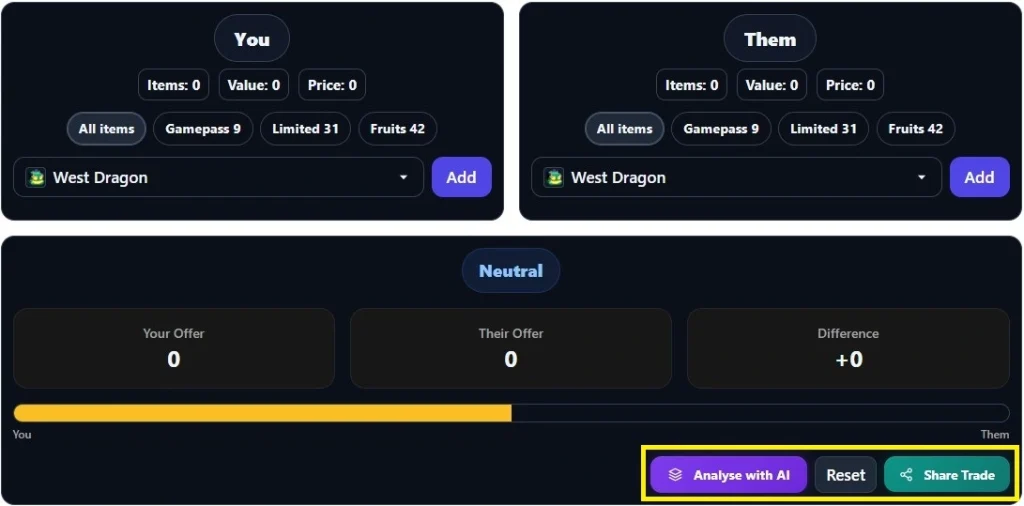
Use the dropdowns to add items to each side. Click "Add" to set quantity and value type.
Blox Fruits Value Calculator: Check Any Trade Instantly
Drop items on both sides and this #1 blox fruits values calculator tells you if a trade is a win, a loss, or fair — with live values pulled from current trading data. No guessing, no scrolling through Discord servers to ask “is this a good trade.”
Quick answer:
- Add your items to one side, their items to the other
- The calculator totals both sides and flags the winner
- Click Analyse with AI for a plain-English breakdown of why
- Values update as the Blox Fruits meta shifts — including after the Dragon rework
- Share Blox Fruits Trade with other Players Instantly
What Does the Blox Fruits Value Calculator Do?
This blox fruit calculator compares two sides of a trade using current community-sourced values, then tells you which side comes out ahead. You’re not just adding up random numbers — the tool accounts for demand, permanent vs. gamepass fruit status, and how items are actually trading right now, not just their base rarity.
Think of it as a second opinion before you hit confirm. Scammers rely on you not checking. This tool takes that excuse away.
How to Use the Blox Fruits Trading Values Calculator
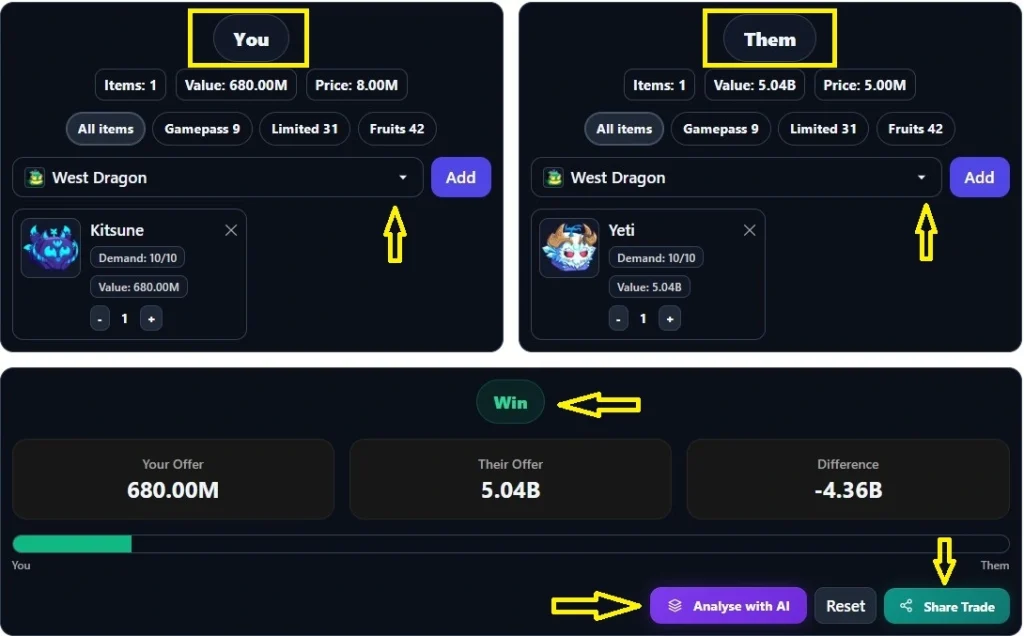
- Search your item in the left panel and add it to “You.”
- Search their item(s) and add them to “Them.”
- Check the bar at the top — it shifts toward whoever’s side is worth more.
- Tap “Analyse with AI” for a full written breakdown of the trade.
- Share it with the Share Trade button if you want a second opinion from a friend.
That’s the whole flow. No sign-up, no ads blocking the tool.
View Blox Fruits Tier List 2026 →
Is My Blox Fruits Trade a Win or a Loss?
This is the blox fruit trade w or l question everyone actually comes here to answer. The calculator gives you a straight verdict — Win, Loss, or Fair — based on the total value gap between both sides.
A trade isn’t just “fair” because the rarities match. A common fruit with high current demand can outvalue a legendary that’s fallen out of favor. That’s why a raw tier list isn’t enough, and why this blox fruits trade checker pulls from active trading trends instead of a static chart.
What Changed With the Dragon Rework Update?
The Blox Fruits Dragon rework update shifted values across the board for both dragon fruits. If you’re holding or trading either one, don’t trust old numbers:
- East Dragon current value — updated post-rework
- West Dragon current value — updated post-rework
Run any dragon trade through the calculator above before you commit. Values move fast right after a rework, and this blox calculator reflects the current numbers, not last month’s.
Blox Fruits Value Tiers Explained
Every item in the calculator sits in one of five tiers. Knowing where an item lands helps you sanity-check the Blox Fruits Value Calculator’s verdict at a glance:
| Tier | What It Means |
|---|---|
| Mythical | Highest-value fruits — dragons, Kitsune, Yeti, Leopard |
| Legendary | Strong fruits, high demand — Phoenix, Portal, Buddha |
| Rare | Solid mid-tier trades — Magma, Ghost, Light |
| Uncommon | Entry-level trading fruits — Ice, Flame, Diamond |
| Common | Lowest value — Spin, Smoke, Blade |
Why Use AI Trade Analysis Instead of Just the Numbers?
The totals bar tells you who wins. The Analyse with AI button tells you why — in plain language, covering demand shifts, whether one side is a permanent fruit, and any red flags in the trade (like one side padding with low-value junk items). If you’re new to trading, this is the difference between knowing the verdict and understanding it.
Frequently Asked Questions
Is this Blox Fruits calculator free to use?
Yes. The full Blox Fruits Value Calculator, including AI trade analysis and trade sharing is free with no account required.
How often are values updated?
Values are reviewed against live blox fruits trading activity and updated after major game changes, including gamepass shifts and rarity reworks like the Dragon update.
Can I share a trade result with a friend?
Yes. Use the Share Trade button to generate a link. It’s built so the trade preview never gets indexed by Google — it’s just for you and whoever you send it to.
What’s the difference between this and a static tier list?
A tier list shows rarity. This blox fruits trading values calculator shows current trade value, which shifts with demand independent of rarity.
Does the calculator account for permanent fruits?
Yes — permanent (gamepass-purchased) fruits are weighted differently than their regular in-game drop counterparts. See the permanent vs. regular fruit values breakdown for the full explanation.
Key Takeaways
- This tool is a blox fruits values calculator built for real trades, not a static chart
- It answers the w or l question directly with a Win / Loss / Fair verdict
- AI analysis explains the reasoning, not just the number
- Values reflect post-Dragon-rework trading, updated as the meta shifts
Related Reading:
- Blox Fruits Stock Tracker — see what’s in the current shop rotation
- Blox Fruits Codes (Real-Time) — redeem for free spins and boosts
- Blox Fruits Level Guide 2026
- Kitsune value
- Dough value
- Tiger value
Run your next trade through the calculator above before you hit confirm.
Source: Blox Fruits wiki
Last Updated: 1st Oct, 2026